


Multi-factor authentication did its job. The user was challenged, they approved, and the login was genuine. That was precisely the problem, because the person who walked away with the access was never the one holding the phone.
Last week one of the businesses in our care was hit by a phishing attack that ended with an attacker-controlled device registered inside their Microsoft 365 tenant. It is called device code phishing. No malware ran, no file was downloaded, and nothing our endpoint tooling could see ever touched a hard drive. The whole compromise happened inside Microsoft’s own login flow, and it was over in well under an hour.
This is a write-up of exactly how it worked, why MFA and a strong password did not stop it, and the specific settings that would have.
The short version
- A phishing email survived Microsoft’s own link protection and led to a Kali365 device code phishing page.
- The user completed a real Microsoft login and approved their own MFA prompt. That single approval was everything the attacker needed.
- Using the Microsoft Authentication Broker app, the attacker registered a device in Entra ID and obtained a Primary Refresh Token, durable access that survives a password reset.
- From the URL being flagged malicious to the stolen token hitting Microsoft Graph: about 40 minutes.
- Endpoint AV and EDR were never in a position to catch it. This is an identity attack, start to finish.
01 · What actually happened
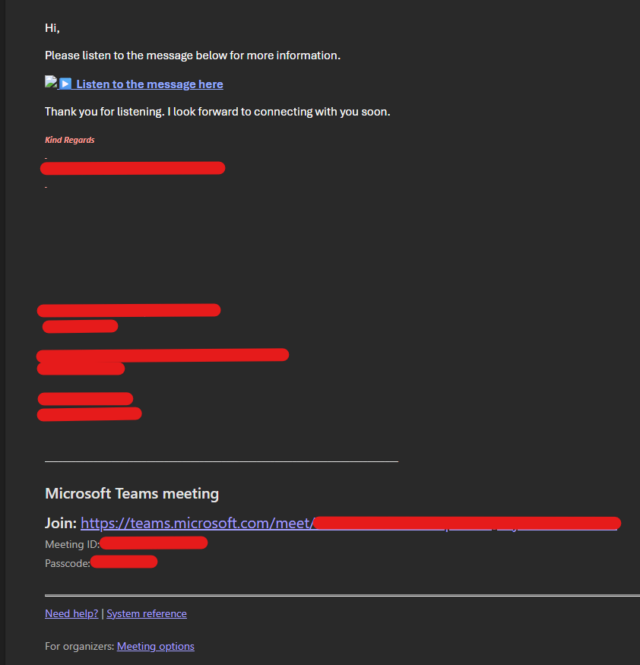
It started the way these almost always do: an email. It carried a link dressed up as a routine document share. Microsoft’s Safe Links rewrote the URL, as designed, but rewriting is not blocking, and at click time the destination had not yet earned a bad reputation. The user was passed straight through.
The page they landed on was a convincing Microsoft sign-in prompt asking them to enter a short device code. What they could not see is that the code had been generated seconds earlier by the attacker’s system, and that entering it was about to bind the attacker’s login attempt to the user’s real, fully authenticated session.
The user did everything right from there. They signed in on the genuine Microsoft page. They approved the MFA prompt on their own phone. To them, nothing looked wrong. To Microsoft, a legitimate person had just authenticated. And to the attacker, quietly polling in the background, a valid token had just dropped into their hands.
02 · Device code phishing, and the kit behind it
The device code flow is a legitimate part of OAuth. It exists so gadgets with no keyboard, a smart TV, a CLI tool, a meeting-room display, can let you log in on your phone instead. You get a short code, you type it into a trusted Microsoft page, and the device is authorised. By design it separates the thing being logged in from the person doing the logging in.
That separation is the whole exploit. If an attacker requests the code and gets you to redeem it, the resulting token is issued to them. Microsoft cannot tell the difference, because from its side a real user really did authenticate.
Kali365 is a phishing-as-a-service kit that packages this into a point-and-click product: hosted lure pages, a polling panel that waits for the victim to redeem the code, a mailbox proxy, and built-in modules for business email compromise. The operators rent it.
03 · The clever part: why MFA did not save them
Here is where a device code attack stops being an ordinary credential theft and becomes something that outlives your response. The token the attacker received was requested through the Microsoft Authentication Broker, the same Microsoft component your phone uses to enrol itself for single sign-on.
With a broker token in hand, the attack escalates in three quiet steps:
- The broker refresh token is exchanged for a token scoped to the Device Registration Service.
- That token registers a brand-new device in Entra ID, the attacker’s own machine, listed as owned by the victim.
- Device identity plus refresh token yields a Primary Refresh Token (PRT), the master key Windows normally reserves for a trusted, signed-in PC.
A PRT carries the user’s MFA claim baked inside it. Every subsequent login is already satisfied, with no fresh prompt, no phone, no challenge. It grants silent single sign-on across the whole Microsoft 365 estate, and crucially, a password reset does not revoke it. The device has to be removed for the key to die. This is the same escalation Microsoft documented with the actor it tracks as Storm-2372. Kali365 has industrialised it.
MFA was not bypassed. It was satisfied, by the victim, and then carried off inside the attacker’s token.
04 · The evidence
Everything above is reconstruction until the sign-in logs confirm it. Ours did. Below is the Entra ID sign-in record for the stolen token being used against Microsoft Graph, with the identifying details redacted. The lines marked with an arrow tell the whole story.
User                : ████████████
Username            : ████████@████████
Status              : Success
Application         : Microsoft Authentication Broker       <--
Application ID      : 29d9ed98-a469-4536-ade2-f981bc1d605e  <--
Original transfer   : Device code flow                      <--
Authentication      : Device Code                           <--
Incoming token type : Primary refresh token                 <--
MFA result          : Satisfied by claim in the token       <--
Resource            : Microsoft Graph
Client app          : Mobile Apps and Desktop clients
Request ID          : ████████████████████████████████████
Four fields decide it: the application is the Authentication Broker, the original transfer method is device code flow, the incoming token is a Primary Refresh Token, and MFA was satisfied by a claim already inside that token, with no live challenge. That combination does not occur in normal use.
05 · How fast it moved
- Earlier — Email delivered. Safe Links rewrites the URL but permits the click; the domain has no bad reputation yet.
- Minutes later — User redeems the device code, authenticates on the genuine page, and approves their own MFA. The attacker’s poller receives a valid broker token.
- 13:58 UTC — The lure is detonated in a public sandbox and flagged malicious, tagged Kali365 and Microsoft OAuth device code phishing.
- Around +30 min — The broker token is exchanged into a device identity in Entra ID, and a Primary Refresh Token is issued.
- 14:37 UTC — The stolen token authenticates against Microsoft Graph as the user, with no fresh MFA. This is the record shown above.
- Same day — Detected and contained: rogue device deleted, sessions revoked, credentials and MFA reset.
06 · Why your EDR was never going to catch this
It is worth being blunt about this, because it reshapes where you spend defensive effort. Endpoint security, AV, EDR, DNS filtering, host isolation, watches the endpoint. This attack barely touched one. The malicious steps were HTTP requests to Microsoft’s own authentication servers and to a phishing panel, made from a browser doing exactly what browsers do.
We did block the lure domain at the DNS layer across our estate, and that is worth doing, it protects the next user who clicks. But the domain is disposable; the operators mint a fresh subdomain per campaign. The block is a speed bump, not the fix. The control surface that matters here is identity, and it lives in Entra ID.
07 · What we did to contain it
The order matters. Because the attacker holds a PRT tied to a device, revoking sessions alone leaves the device able to mint fresh tokens. Kill the device first.
- Delete the rogue device in Entra, not disable, delete. This is what actually invalidates the Primary Refresh Token.
- Revoke sign-in sessions for the user, then reset the password and force re-registration of MFA.
- Audit the authentication methods for anything the attacker added during the window.
- Comb the mailbox and tenant: new inbox rules, forwarding, freshly granted app consents, and mailbox-access events in the audit log.
- Scope beyond one user. One lure rarely goes to one person. Check for any other device registered in the same window.
08 · Shut the door: tenant hardening
None of these are exotic. They are settings most tenants ship with wide open, and any one of them breaks this attack chain.
- Block the device code flow in Conditional Access, using the authentication-flows condition, wherever it is not genuinely needed. This is the single highest-value control.
- Guard device registration. Put a Conditional Access policy on the “Register or join devices” user action, and restrict who is allowed to register at all.
- Revoke on suspicion, fast. Have session revocation and device deletion ready as a runbook, not a research exercise.
- Move toward phishing-resistant MFA, passkeys or FIDO2. This attack never touched the password; it defeated the second factor by borrowing it.
- Alert on the pattern: device code sign-ins for the Authentication Broker, PRT issuance close in time to a new device registration, and sign-ins from the operator infrastructure below.
09 · Indicators of compromise
Defanged for safety. Hunt these across sign-in logs and DNS, and treat the network range as an identity indicator, not an endpoint one.
| Type | Indicator | Context |
|---|---|---|
| Domain | xb8ch9dus2[.]maxnneli[.]com | Kali365 lure host (rotates per campaign) |
| OAuth client | 29d9ed98-a469-4536-ade2-f981bc1d605e | Microsoft Authentication Broker, abused |
| ASN | AS132203 | Tencent Cloud, operator hosting |
| Network | 43.173.64.0/20 | Operator sign-in range |
| User agent | python-requests/* | Seen on token-refresh calls |
| Auth pattern | Device Code + PRT | In Entra sign-in records |
10 · The takeaway
The uncomfortable lesson is that “we have MFA” is no longer the end of the sentence. MFA stops password reuse and credential stuffing. It does not stop a user from being tricked into approving a login that is not theirs, and once that approval is captured in a token that can register a device, the attacker has a foothold that looks exactly like a legitimate one.
Defence has moved. The perimeter that matters for this class of attack is not the endpoint and not the password, it is the set of identity controls that decide who may register a device and which authentication flows you permit at all. Those are configuration, not spend. Set them before you need them.
If you would like us to review your tenant against exactly this attack path, that is a conversation we are happy to have.